Private notes
inside Notion
Create private notes inside your Notion workspace that only you can read. Lock them with a password — no one else can access them, not even us.
How it works?
Three simple steps to start protecting your notes.
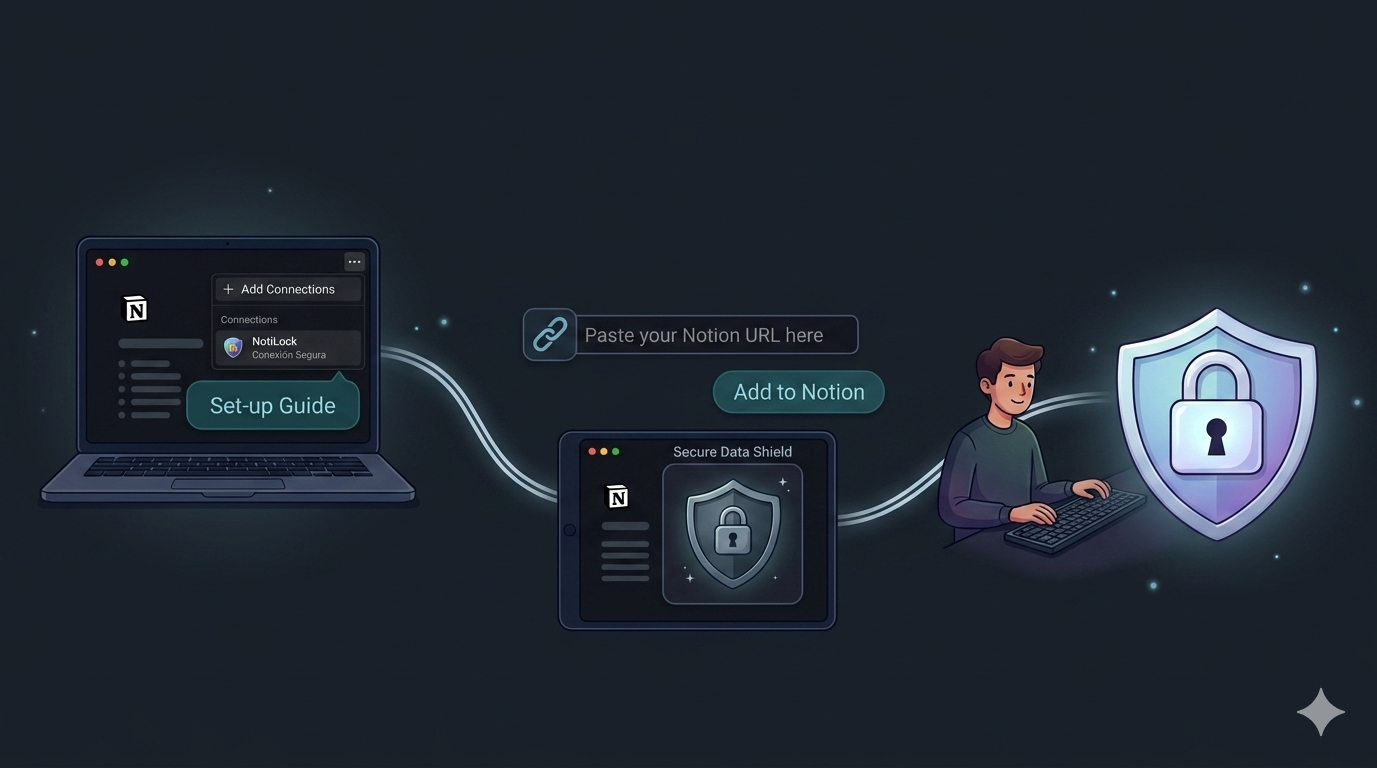
Connect Notilock to Notion
Open any Notion page, go to ··· → Connections, and add Notilock.
Paste your Notion page URL
In Notilock, paste your page URL and click "Add to Notion". The encrypted widget appears automatically.
Set a password and write
Choose a master password for your note. Only you will be able to read it.
Built for privacy-first
Store personal notes and sensitive data inside Notion — without compromising security.
Zero-knowledge
Encryption happens in your device. The server only stores ciphertext it can never read.
Master password
Only stored in volatile memory. Never sent to any server, database, or API.
AES-256 encryption
Industry-standard encryption via crypto-js. Your data is as secure as your password.
Instant embed
Embed encrypted blocks directly in Notion pages. Works seamlessly with your existing workflow.
No cookies, no tracking
Privacy-first analytics via Plausible. No cookies, no personal data collection.
Data stays in Notion
The encrypted data is stored directly in your Notion Workspace page, not on our servers. We have no access to your notes or secrets.
Only you can see your content
A simple architecture that keeps your secrets truly private.
The worker never sees your plaintext or password. It only forwards encrypted data between your browser and Notion. Even if our servers are compromised, your data remains unreadable.
Frequently asked questions
Everything you need to know about Notilock.
What happens to my notes if Notilock disappears?
Nothing — your data is safe. Your encrypted notes live inside your own Notion workspace, not on our servers. Even if Notilock shuts down, the ciphertext stays right there in your Notion pages. With your master password and any standard AES-256 decryption tool, you can recover your content at any time. Your notes never disappear.
Can Notilock read my notes?
No. Encryption and decryption happen entirely in your browser. Your master password never leaves your device — we never see it, store it, or transmit it. Our server only handles encrypted ciphertext that is unreadable without your password.
What if I forget my master password?
We cannot recover it. Since we use zero-knowledge encryption, your password only exists in your browser's memory while you're using the app. If you lose it, the encrypted content cannot be decrypted. We recommend storing your master password in a trusted password manager.
How does the free trial work?
Notilock offers a 7-day free trial with full access — unlimited notes, AES-256 encryption, no restrictions. After the trial, you can still read and decrypt your existing notes. To continue creating and editing, upgrade to Unlimited with a one-time payment.
What happens if I change my master password?
Notes encrypted with a previous password stay encrypted with that password — they don't update automatically. To switch, open each note, decrypt it with the old password, then re-encrypt it with the new one. We recommend using a password manager to keep track.
Do I need to install anything?
No. Notilock works entirely in your browser. Just open the app, connect your Notion workspace, and start encrypting. There are no extensions, plugins, or desktop apps to install.
Built by an indie developer
Notilock is built by David, an independent developer. No VC funding, no data harvesting, no hidden agendas — just a simple tool that does one thing well: protect your private notes inside Notion.
Ready to protect your Notion data?
Start encrypting your sensitive notes in seconds. No credit card required.
Get started for free